

Integrating DLT Into a KNIME Workflow| A Beginner’s Guide
Today I would like to show you (step by step) how you can integrate the Distributed-Ledger-Technolgy-Protocol IOTA into a State-Of-The-Art Data-Science-Software-Workflow of the KNIME Analytics Platform.
If don’t know what KNIME or IOTA is, here is a short overview:
· IOTA is a DLT based on a Directed Acyclic Graph (DAG), it was built to power the future of the Internet of Things. IOTA is permissionless, feeless and made for IoT microtransactions. The development of the protocol increased in 2020 a lot and we can expect some first Smart Contracts (PoC) in August 2020.
· The KNIME Analytics Platform is one of the leading platforms for data driven innovations (Gartner’s 2019 Magic Quadrant for Data Science and Machine Learning Platforms). With the KNIME Analytics Platform it is possible, to create visual workflows easily by drag and drop.
· IOTA & KNIME are both open source!
Let’s get started!
Overview
Step 1: Setting up KNIME and Anaconda
Step 2: Installing PyOTA
Step 3: The DLT-IOTA-Node Workflow (NodePit)

Step 4: The Nodes (Components)
Step 5: What Are The Use Cases? (Vision)
Step 1: Setting up KNIME and Anaconda
Fist of all, we need to install the KNIME Analytics Platform which we can download here (If you need some help to install it, the installtion guide may help you). After we successfully installed the KNIME Analytics Platform, we need to add the “Python Integration”. Go to the menu bar, choose Help>>Install New Software…” then, the following window will appear:
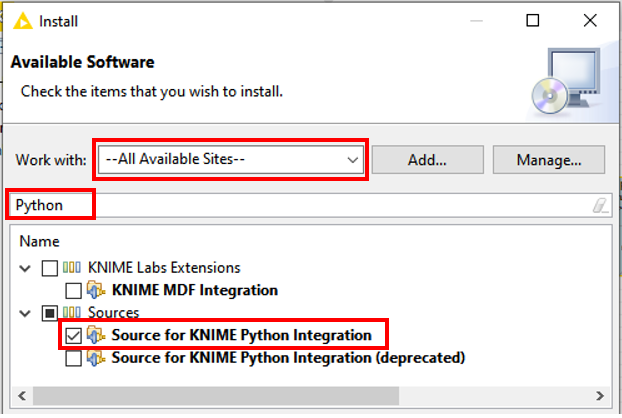
Then click on “Next” and install the “Source for KNIME Python Integration” (The installation may take a minute or two).
Due to the fact that we are going to connect the KNIME Analytics Platform with the IOTA protocol by using Python nodes (If you don’t know what a nodes are, click here – Important!), we have to download and install Python – to keep thing simple, we use Anaconda (If you need some help with Anaconda, here are the docs).
Are you ready?! Perfect! Now we have to connect the KNIME Analytics Platform with Anaconda to set-up a KNIME specific Python environment. Click here to get to the configuration guide and follow “Option 1: Conda (recommended)” to setup a Python 3 environment. When the environment is created, click on “Apply and Close” to close the window and exit the KNIME Analytics Platform.
Step 2: Installing PyOTA
Now we are installing the official Python library for the IOTA Core which is called PyOTA (Here you can find the docs!).