
The FULL POWER March update
The Soonaverse is envisioned to become an all-encompassing suite of services that showcase the unparalleled power of the IOTA protocol. The NFT marketplace that launched just a month ago has processed over $2.5 million in NFT purchases and not a single fee was paid. With this release, we’re taking it a step further by implementing the ability to trade NFTs with zero fees.
Before we dive deeper into this incredible new set of features, let’s make sure to stop and appreciate all the work our development team shipped over this last two week sprint:
- Ability to make NFT available for sale / auction
- Added Starts In / Ends On (auction)
- Auto refresh page when auction / sale starts
- Ability to make NFT available to only one member
- Added price history graph
- Improved NFT timeline, add my transactions, my bids and my offers
- Limited Edition Collections
- Improved tags on collection cards
- Display Sale Starts on collection
- Improved verbiage on discounts within collection
- Improve how Royalties / Creator show on collection
- Added languages and switch
- Add notifications (starting with only three types for now)
- Add share links on spaces/award/member/proposals
- Implemented new graphs for smoother view
- Added JOINED tag on space card within discovery
- Warning not to send funds from exchange
- Cleaned up UI on how text is shown/tweaks/etc.
- Fixed issue with filename on single upload
- Alliances mobile view adjustments
- Ability to click on spaces within collection
- Improved Mobile view for member’s profile
Our main objective is to focus on user experience. We understand that not every piece of the UI is perfect, but we truly believe that the best way to make great software is to get it into the hands of the community as fast as possible. That way everybody can test, figure out what would make the system better, and give great feedback. From there, the Soonaverse team does what they do best: Validate, iterate, and improve!
Want to learn more about this latest release? Let’s talk about that.
Selling an NFT
Before you can sell your NFTs, you’ll need to verify your IOTA wallet. If you haven’t done this already then please follow these instructions: https://docs.soonaverse.com/en/all-users-getting-started/verifying-your-iota-wallet

If you have an NFT that you’d like to sell, then you can click the “Sell NFT” button from your NFT page. After that, you have two options: Fixed Price or Auction.
For Fixed Price, you need to fill out the price, when the NFT will be available for sale (your local date/time), and whether or not it’s an open sale or meant for a specific member. Defining a specific member is an easy way to transfer NFTs to other members in the Soonaverse. We would like to note that this is not “swapping” NFTs and should be used with caution when attempting to trade with other community members.
For Auctions, you only need to establish the floor price (the minimum you’re willing to sell the NFT for) and the availability date (your local date/time). Just for simplicity, all auctions will have a duration of 3 days for this first release. We’re starting with 3 days, but this platform is a configurable engine. The Soonaverse will do a proposal to get feedback from the community to see which duration options should be opened next.
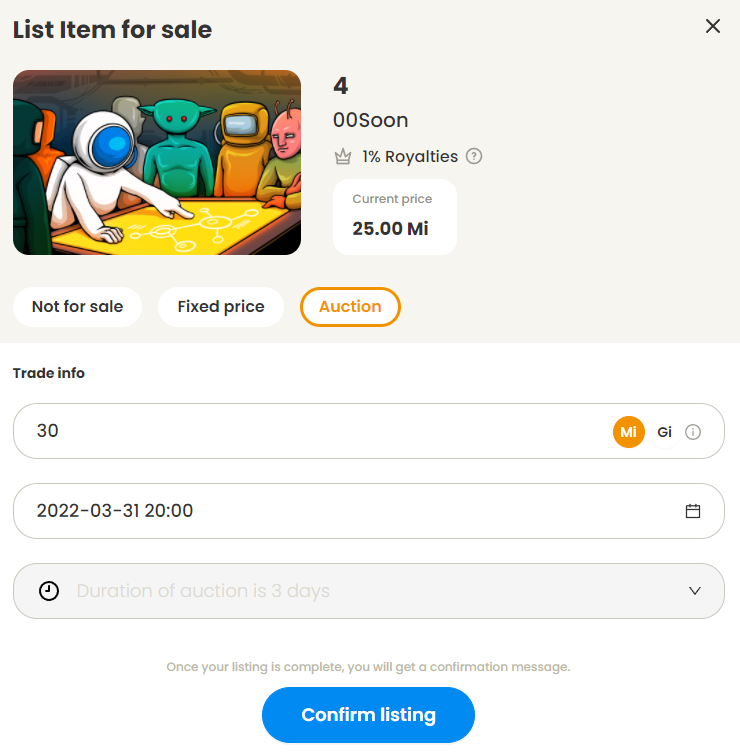
NFT owners that have listed an NFT for sale have the ability to modify the fixed price, change it to an auction, or stop the sale completely. If at any point a sale stops because the owner suddenly made it unavailable, the NFT will go back to its original price.
Bidding on an NFT
Now when you’re on a page that’s about to start selling an NFT, the page will automatically refresh once the time for the sale comes live. This means there’s no more need to constantly refresh your screen before a sale starts.
Check the Terms and Conditions box, click “Make a bid”, and an iota address will appear. Copy the IOTA address and use your wallet of choice (Firefly or Tanglepay) to send your bid amount to that address to make your official bid. After a few seconds, if you made the highest bid, then you’ll see a green notification in the Soonaverse that you have the highest bid: